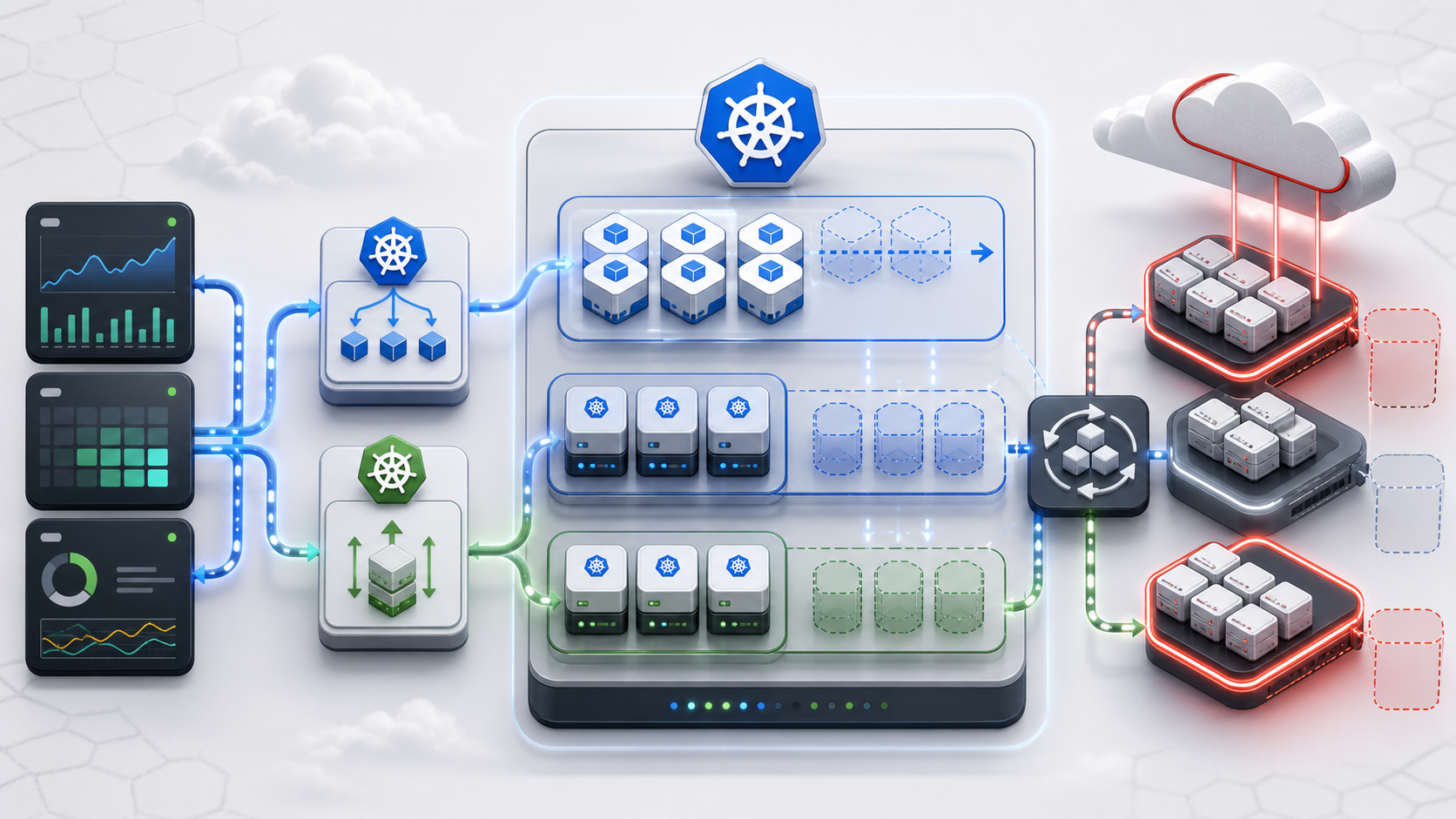
Mastering OKE Autoscaling: Implementing HPA and VPA on Oracle Cloud Infrastructure
Autoscaling Oracle Container Engine for Kubernetes is not one controller doing one magic thing. It is a chain of control loops: workload autoscalers decide how many pods or how much resource each pod should request, the scheduler determines whether those pods fit, and the Cluster Autoscaler asks OCI to add or remove worker capacity from configured pools. Production success depends on keeping those loops aligned.
Contents
Introduction
OKE autoscaling should be designed as a layered system. The HorizontalPodAutoscaler scales replicas. The VerticalPodAutoscaler recommends or applies per-container CPU and memory request changes. The Cluster Autoscaler scales worker nodes in configured OCI-backed pools after pods become unschedulable. These controllers observe different signals and write different parts of the Kubernetes or OCI state. Problems appear when they are asked to optimize the same signal at the same time.
| Layer | Controller or mechanism | Primary role | Production note |
|---|---|---|---|
| Node layer | Cluster Autoscaler with OKE node pools or OCI instance pools | Increases or decreases the size of existing infrastructure pools that you explicitly configure. | It does not create application pods; it reacts after pods become unschedulable for capacity reasons. |
| Pod layer | HorizontalPodAutoscaler | Changes replicas on a scalable workload such as a Deployment, StatefulSet, or ReplicaSet. |
In autoscaling/v2, HPA can evaluate CPU, memory, custom, object, and external metrics. |
| Resource layer | VerticalPodAutoscaler | Changes or recommends CPU and memory requests for containers selected through a target workload. | The update mode determines whether VPA only reports recommendations or also mutates pods. |
| Safety layer | Policy, review, and ownership boundaries | Prevents multiple controllers from trying to optimize the same resource signal at the same time. | Do not configure HPA and VPA to control the same CPU or memory metric for the same workload. |
- The OCI Cluster Autoscaler provider supports OKE node pools and OCI instance pools.
- For managed OKE node pool autoscaling, the usual target is an ocid1.nodepool....
- For self-managed Kubernetes on OCI, and for some OCI managed instance pool patterns, the target can be an ocid1.instancepool....
- Treat them as distinct backends and do not mix pool types in one autoscaler configuration unless your tested autoscaler version explicitly supports that mix.
Architectural Overview
OKE node pools, Cluster Autoscaler, and OCI pool capacity
OKE separates the managed Kubernetes control plane from worker capacity. Your workloads run on worker nodes that belong to node pools. A node pool defines the shape, image, placement, labels, taints, subnet placement, and size of the group of workers. The Kubernetes scheduler sees those workers as Node objects with allocatable CPU, memory, ephemeral storage, device plugin resources, labels, taints, and topology metadata.
Cluster Autoscaler sits inside the cluster as a Kubernetes workload, usually in kube-system. It watches for pods that the scheduler cannot place because the currently available nodes do not satisfy the pod's resource requests or scheduling constraints. When a pod is unschedulable for capacity reasons, Cluster Autoscaler simulates whether adding a node from a configured pool would make that pod schedulable. If the simulation succeeds and the pool is below its maximum size, the autoscaler calls the OCI APIs to increase pool size.
Scale-down is conservative by design. Cluster Autoscaler looks for nodes that have been underutilized long enough and whose pods can be moved elsewhere while respecting scheduling rules, pod disruption budgets, local storage rules, priorities, and system pod handling. It then drains and removes capacity from the backing pool. This means node removal is slower and more policy-sensitive than scale-up.
OKE autoscaling control loop map
| Stage | Controller or service | Decision made | Resulting signal |
|---|---|---|---|
| 1 | Metrics APIs | Expose resource, custom, object, or external metrics. | HPA and VPA have current workload signals to evaluate. |
| 2 | HorizontalPodAutoscaler | Compares observed metrics with configured targets. | Replica count increases or decreases on the target workload. |
| 3 | VerticalPodAutoscaler | Recommends or applies CPU and memory request changes. | Per-pod resource requests change, depending on update mode. |
| 4 | Kubernetes scheduler | Attempts to place pods on existing OKE workers. | Pending pods reveal capacity, topology, taint, or shape gaps. |
| 5 | Cluster Autoscaler for OCI | Evaluates whether a configured pool can fit Pending pods. | OCI node pool or instance pool target size changes. |
Architectural Breakdown
The control loop begins with metrics entering the Kubernetes metrics APIs. HPA reads those metrics and changes the target workload's replica count, while VPA reads resource history and recommends or mutates CPU and memory requests. The Deployment creates pods from those decisions, the scheduler tries to place those pods on existing OKE workers, and unschedulable pods become the input signal for Cluster Autoscaler. Cluster Autoscaler then calls OCI pool APIs to resize pre-existing OKE node pools or OCI instance pools, after which new nodes join the cluster and the scheduler can bind the waiting pods.
How the pool interaction works in practice
The Cluster Autoscaler OCI provider models a configured pool as a node group. In managed OKE deployments, that node group is usually an OKE node pool identified by a node pool OCID. In self-managed Kubernetes on OCI, the node group can be an OCI instance pool backed by an instance configuration. In both cases, Cluster Autoscaler is not creating arbitrary capacity. It is changing the target size of known pools inside min and max boundaries.
That distinction matters operationally. An OKE managed node pool already knows how to join new workers to the OKE cluster. An OCI instance pool used outside normal OKE node pool management must launch instances with bootstrap logic, commonly via cloud-init or user data, so new compute instances register as Kubernetes nodes after they start. If that bootstrap path fails, Cluster Autoscaler can successfully increase OCI capacity while Kubernetes still sees no useful Ready nodes.
The flow is therefore:
- HPA or a deployment rollout creates more pods, or existing pods need more requested resources.
- The scheduler marks one or more pods Pending because current nodes cannot satisfy CPU, memory, topology, taints, affinity, or device requirements.
- Cluster Autoscaler evaluates configured node pools or instance pools and selects a pool that would make the pod schedulable.
- Cluster Autoscaler calls OCI to increase the selected pool size, bounded by
min,max, OCI service limits, quota, and pool configuration. - OCI provisions compute capacity; the node joins the cluster; the scheduler binds Pending pods.
- Later, Cluster Autoscaler may drain and remove underused nodes if pods can be safely moved elsewhere.
Cluster Autoscaler on OCI: managed node pools vs instance pools
Cluster Autoscaler is often described as a node autoscaler, but the important unit is the configured pool. It does not scan your tenancy and invent new capacity. It needs either explicit --nodes=<min>:<max>:<pool-ocid> entries or supported node group autodiscovery rules. Pools that are not referenced are invisible to the autoscaler.
For OKE, Oracle documents Cluster Autoscaler as a way to resize managed node pools based on workload demand. The autoscaler adds nodes when a pod cannot be scheduled because of insufficient requested resources and removes nodes when they have been underutilized long enough and their pods can move to existing nodes. It works per node pool, and Oracle recommends keeping at least one node pool unmanaged so critical add-ons and the autoscaler itself have somewhere stable to run.
| Mode | Typical target identifier | Best fit | Operational requirement | Primary risk |
|---|---|---|---|---|
| OKE managed node pool | ocid1.nodepool... |
Managed OKE clusters where Oracle manages node pool lifecycle integration. | Create the node pool first, define sane min and max values, and grant the autoscaler permission to manage cluster node pools. | Manual pool size changes, Terraform drift, missing requests, or placing Cluster Autoscaler only on the pool it is allowed to scale to zero. |
| OCI instance pool | ocid1.instancepool... |
Self-managed Kubernetes on OCI, or tested enhanced-cluster patterns that intentionally use OCI managed instance pools. | Instance configuration must bootstrap new instances into the existing cluster and register them as Ready nodes. | OCI capacity appears but Kubernetes nodes never join, often because user data, cloud-init, IAM, networking, or node labels are wrong. |
| Node group autodiscovery | Pool tags plus cluster and compartment metadata | Large environments with multiple pools and standardized tagging. | Tag rules must be precise, stable, and guarded by policy. Static --nodes entries should not be combined with autodiscovery in the same deployment. |
Overly broad tag selectors may expose unintended pools to autoscaler control. |
Why resource requests are the hinge
Cluster Autoscaler reacts to scheduling feasibility, not average node CPU graphs. A node can be hot while no pods are Pending, and Cluster Autoscaler will not add nodes for that reason alone. Conversely, a cluster can have low observed utilization while a pod remains unschedulable because it requests a large contiguous amount of memory, needs a GPU, requires a topology zone, or cannot tolerate the available nodes' taints.
This is why resources.requests are not paperwork. They are the contract among workload owners, the scheduler, Cluster Autoscaler, ResourceQuota, bin-packing behavior, and cost. HPA can increase pod count, and VPA can increase per-pod requests. Either action may create Pending pods. Pending pods are the signal that Cluster Autoscaler can turn into node pool growth.
HPA vs VPA: use cases, metrics, and conflicts
HPA and VPA answer different scaling questions. HPA asks, "How many pod replicas should run?" VPA asks, "How much CPU and memory should each pod request?" In a mature OKE platform, both are useful, but they should be assigned clear responsibilities.
| Dimension | HPA | VPA | Production guidance for OKE |
|---|---|---|---|
| Primary action | Changes the replica count through the target workload's scale subresource. | Recommends or applies CPU and memory requests, depending on updateMode. |
Use HPA for elastic serving capacity and VPA for right-sizing requests, especially for workloads with stable per-pod behavior. |
| Best use cases | Stateless web services, APIs, workers, event consumers, and workloads where more replicas increase throughput. | Batch jobs, stateful services, JVM or runtime-heavy applications, and workloads where request sizing is difficult to estimate manually. | For latency-sensitive services, HPA commonly owns fast response to load while VPA runs in Off or Initial mode until recommendations are trusted. |
| Supported metric types | Resource metrics such as CPU and memory, plus custom, object, and external metrics when metrics APIs are installed. | Resource usage history for CPU and memory. VPA status exposes target, lower bound, upper bound, and uncapped target recommendations. | Install and monitor Metrics Server for resource metrics. Add Prometheus Adapter, OCI Monitoring integration, or another adapter only when custom or external metrics are required. |
| Control-loop input | Observed metric value compared with a configured target. With multiple metrics, HPA evaluates each and uses the largest desired replica count. | Historical and recent resource consumption, out-of-memory signals, and resource policy constraints such as minAllowed and maxAllowed. |
HPA is generally more reactive. VPA recommendations should be reviewed after enough representative load has been observed. |
| Workload change surface | Replica count changes. Existing pods usually remain unchanged. | Pod request changes may happen at admission time, by deletion and recreation, or through in-place resize modes where supported and enabled. | Use PodDisruptionBudgets and readiness probes before allowing VPA modes that can evict pods. |
| Interaction with Cluster Autoscaler | More replicas can create Pending pods, which can trigger node pool scale-up if the configured pool can fit them. | Larger requests can create Pending pods after pod recreation or admission, which can also trigger node pool scale-up. | HPA and VPA both influence the scheduler, so Cluster Autoscaler behavior depends on accurate requests and pool shapes that can fit recommended pod sizes. |
| Conflict pattern | When HPA scales on CPU or memory utilization, it uses resource requests in the utilization denominator. | When VPA changes CPU or memory requests, it changes the denominator HPA uses for resource utilization. | Do not run HPA and VPA against the same resource metric for the same target. Split signals or make VPA recommendation-only. |
| Common safe combination | HPA scales on custom business metrics, queue depth, request rate, or CPU while VPA does not control that same metric. | VPA uses Off mode for recommendations, Initial for create-time defaults, or controls a different resource than HPA. |
A strong baseline is HPA on custom/external traffic metrics plus VPA on CPU and memory in Off mode for weekly right-sizing reviews. |
| Failure mode | Too-low targets cause replica churn and cost spikes; too-high targets cause saturation before new pods and nodes arrive. | Too-large recommendations can exceed the largest node's allocatable resources, leaving pods Pending even after node scale-up attempts. | Set sane min/max replicas, VPA minAllowed/maxAllowed, pool sizes, and alerts for Pending pods and failed scale-ups. |
Complete HorizontalPodAutoscaler example using CPU and memory targets
The following manifest shows a structural autoscaling/v2 HPA for a Deployment. It tracks both CPU and memory utilization. Kubernetes evaluates each metric independently, computes a desired replica count for each, and selects the highest recommendation within the configured minReplicas and maxReplicas.
For resource utilization targets to work, each container in the selected pods must define CPU and memory requests. Without requests, utilization-based HPA math cannot be calculated reliably for those resources.
apiVersion: autoscaling/v2
kind: HorizontalPodAutoscaler
metadata:
  name: payments-api
  namespace: production
  labels:
    app.kubernetes.io/name: payments-api
    app.kubernetes.io/component: api
    app.kubernetes.io/part-of: commerce-platform
spec:
  scaleTargetRef:
    apiVersion: apps/v1
    kind: Deployment
    name: payments-api
  minReplicas: 3
  maxReplicas: 30
  metrics:
    - type: Resource
      resource:
        name: cpu
        target:
          type: Utilization
          averageUtilization: 65
    - type: Resource
      resource:
        name: memory
        target:
          type: Utilization
          averageUtilization: 75
  behavior:
    scaleUp:
      stabilizationWindowSeconds: 0
      selectPolicy: Max
      policies:
        - type: Percent
          value: 100
          periodSeconds: 60
        - type: Pods
          value: 6
          periodSeconds: 60
    scaleDown:
      stabilizationWindowSeconds: 300
      selectPolicy: Min
      policies:
        - type: Percent
          value: 25
          periodSeconds: 60
Reference Deployment shape for the HPA
This companion Deployment is included to show the resource requests that make CPU and memory utilization targets meaningful. In a real OKE cluster, tune the values from load tests and production telemetry rather than copying them as defaults.
apiVersion: apps/v1
kind: Deployment
metadata:
  name: payments-api
  namespace: production
  labels:
    app.kubernetes.io/name: payments-api
spec:
  replicas: 3
  selector:
    matchLabels:
      app.kubernetes.io/name: payments-api
  template:
    metadata:
      labels:
        app.kubernetes.io/name: payments-api
    spec:
      terminationGracePeriodSeconds: 30
      containers:
        - name: api
          image: iad.ocir.io/example/commerce/payments-api:1.24.0
          imagePullPolicy: IfNotPresent
          ports:
            - name: http
              containerPort: 8080
          readinessProbe:
            httpGet:
              path: /ready
              port: http
            initialDelaySeconds: 8
            periodSeconds: 5
          livenessProbe:
            httpGet:
              path: /healthz
              port: http
            initialDelaySeconds: 20
            periodSeconds: 10
          resources:
            requests:
              cpu: "250m"
              memory: "512Mi"
            limits:
              cpu: "1000m"
memory: "1Gi"Complete VerticalPodAutoscaler manifest configuring recommendation behavior
The following VPA manifest targets the same Deployment but runs in recommendation-only mode by setting updateMode: "Off". This is the safest starting point for production because the VPA recommender still calculates recommendations and publishes them in VPA status, while the controller does not mutate live pod resources.
The manifest also demonstrates container-level policy. The api container receives CPU and memory recommendations, bounded by minAllowed and maxAllowed. The sidecar-metrics container is explicitly disabled so its tiny resource profile does not receive noisy recommendations.
apiVersion: autoscaling.k8s.io/v1
kind: VerticalPodAutoscaler
metadata:
  name: payments-api
  namespace: production
  labels:
    app.kubernetes.io/name: payments-api
    app.kubernetes.io/component: api
    app.kubernetes.io/part-of: commerce-platform
spec:
  targetRef:
    apiVersion: apps/v1
    kind: Deployment
    name: payments-api
  updatePolicy:
    # Recommended production starting mode:
    # - "Off" publishes recommendations without changing pods.
    # Other modes to test deliberately:
    # - "Initial" applies recommendations only when pods are created.
    # - "Recreate" may evict and recreate pods to apply new requests.
    # - "InPlaceOrRecreate" attempts in-place resize, then falls back
    #   when the required feature gates and runtime path support it.
    updateMode: "Off"
    minReplicas: 2
  resourcePolicy:
    containerPolicies:
      - containerName: api
        mode: Auto
        controlledResources:
          - cpu
          - memory
        controlledValues: RequestsOnly
        minAllowed:
          cpu: "150m"
          memory: "256Mi"
        maxAllowed:
          cpu: "2000m"
          memory: "2Gi"
      - containerName: sidecar-metrics
        mode: Off
How to interpret VPA recommendations
After the VPA has observed representative workload behavior, inspect its status. The exact command output varies by cluster tooling, but the important fields are:
recommendation:
  containerRecommendations:
    - containerName: api
      target:
        cpu: 420m
        memory: 740Mi
      lowerBound:
        cpu: 180m
        memory: 420Mi
      upperBound:
        cpu: 900m
        memory: 1200Mi
      uncappedTarget:
        cpu: 420m
        memory: 740Mi
The target is the recommended request after policy constraints. The uncappedTarget shows what the recommender would have suggested without your minAllowed and maxAllowed policy. A large gap between target and uncapped target is a sign that policy is limiting recommendations. That may be intentional, but it should be reviewed alongside latency, error rate, throttling, out-of-memory events, and node fit.
| Mode | What it does | When to use it | Risk profile |
|---|---|---|---|
Off |
Generates recommendations only. It does not change pod resources. | Initial rollout, audits, GitOps review, capacity planning, and safe pairing with HPA. | Low runtime risk; recommendations still need human or automation review. |
Initial |
Applies recommendations when pods are created, but does not change them during their lifetime. | Workloads that can benefit from right-sized starts without mid-life eviction. | Moderate; new pods may request more than expected and trigger node scale-up. |
Recreate |
Can delete and recreate pods to apply new recommendations. | Controlled environments with PodDisruptionBudgets, multiple replicas, and tested restart behavior. | Higher; can cause disruption and scheduling pressure. |
InPlaceOrRecreate |
Attempts in-place resize and falls back to recreate when needed. | Clusters where the required feature gates, Kubernetes version, runtime, and VPA deployment support in-place resizing. | Version-sensitive; test thoroughly before production use. |
Critical warnings: why HPA and VPA must not control identical resource metrics
The most common autoscaling anti-pattern is enabling HPA on CPU utilization and VPA on CPU requests for the same Deployment, then wondering why the system oscillates. The problem is mathematical as much as operational.
For CPU utilization, HPA compares current CPU usage with requested CPU. If a pod uses 300m CPU and requests 500m, it is at 60% utilization. If VPA raises the request to 1000m while usage remains 300m, the same pod suddenly appears to HPA as 30% utilized. HPA may scale down. If VPA later lowers requests, utilization rises and HPA may scale up. Both controllers are trying to correct the same signal, but one controller changes the denominator used by the other.
Memory can be even more confusing because memory pressure is often sticky. VPA may raise memory requests to avoid out-of-memory kills. HPA, if configured on memory utilization, may react to the new request baseline and change replicas in a way that no longer tracks traffic. The result can be cost spikes, under-provisioning, or long periods where Cluster Autoscaler receives conflicting scheduling pressure.
Architectural warning: when VPA changes CPU or memory requests, it changes the resource baseline that HPA uses for utilization math. Treat same-resource HPA and VPA pairings as a design defect unless a platform review proves the controllers are operating on separate signals.
Safe patterns for combining HPA and VPA
| Pattern | How to apply it | Why it is safer |
|---|---|---|
| Recommendation-only VPA | Run VPA in Off mode and export recommendations to a review process while HPA owns live replica scaling. |
VPA provides sizing intelligence without changing the denominator used by HPA utilization math. |
| HPA on business pressure | Use HPA on custom or external metrics such as requests per second, queue depth, Kafka lag, OCI Monitoring signals, or SLO burn rate. | Replica scaling follows demand while VPA can still recommend CPU and memory request changes. |
| Split resource ownership | Use separate signals only when justified, such as HPA on CPU and VPA on memory, and document the operational reason. | Clear ownership reduces controller feedback loops and gives reviewers a specific design rationale. |
| Bounded recommendations | Set minAllowed and maxAllowed so a recommendation cannot exceed the largest practical node shape in the target pool. |
VPA cannot recommend pod sizes that are impossible for the OKE node pool to schedule. |
| Disruption-aware mutation | Use PodDisruptionBudgets before enabling VPA modes that evict pods, and confirm that Cluster Autoscaler can add nodes quickly enough. | Request changes become part of a controlled rollout path instead of a surprise availability event. |
Unsafe patterns to reject in review
| Pattern to reject | Why it is risky | Review response |
|---|---|---|
| HPA on CPU utilization plus VPA controlling CPU requests on the same target. | VPA changes the request baseline that HPA uses to calculate CPU utilization. | Move VPA to Off mode, remove CPU control from VPA, or move HPA to a non-resource metric. |
| HPA on memory utilization plus VPA controlling memory requests on the same target. | Memory request changes can make replica decisions drift away from real traffic pressure. | Keep one controller as the owner of memory behavior and document the chosen signal. |
VPA Recreate mode on a single-replica service without a PodDisruptionBudget or tested restart path. |
Evictions can become visible downtime for the only serving pod. | Add redundancy, define disruption policy, or keep VPA recommendation-only. |
| VPA maximums larger than any node in the OKE node pool can fit. | Pods may remain Pending forever even though the recommendation appears valid. | Lower maxAllowed, choose larger shapes, or split the workload. |
| Cluster Autoscaler deployed only onto a node pool it is allowed to scale to zero. | The autoscaler can remove its own runtime capacity and stop making decisions. | Run critical add-ons on a stable pool that remains above zero nodes. |
| Terraform or manual console operations continually resetting node pool size while Cluster Autoscaler is managing that pool. | External writers can fight the autoscaler and create repeated scale churn. | Ignore desired size drift where appropriate and let autoscaler manage runtime capacity. |
Implementation sequence for production OKE autoscaling
Autoscaling should be rolled out in layers. The goal is to make each control loop observable before allowing the next one to change state automatically.
| Step | Action | Implementation detail |
|---|---|---|
| 1 | Establish workload resource contracts | Define realistic CPU and memory requests for every production container. Add readiness probes, liveness probes, graceful termination, and PodDisruptionBudgets where downtime matters. Requests determine scheduling and Cluster Autoscaler behavior, so they must represent actual baseline needs rather than arbitrary placeholders. |
| 2 | Prepare OKE node pools | Create node pools with shapes that can fit the largest expected pod requests after VPA recommendations. For multi-availability-domain designs, prefer separate pools or placement strategies that make topology behavior explicit. Label pools by purpose, such as workload=api, workload=batch, or accelerator=gpu, and use taints when specialized capacity must stay reserved. |
| 3 | Deploy Cluster Autoscaler with least privilege | Grant only the OCI permissions needed for the chosen pool mode. For OKE node pools, allow node pool management plus supporting read/use permissions for relevant network and instance resources. For instance pool mode, include instance pools, instance configurations, instance family, volume family, networking, and compartment inspection. Prefer workload identity where it is already standardized; otherwise use instance principals or a carefully managed OCI config secret. |
# Structural command fragment inside the Cluster Autoscaler container.
# Use node pool OCIDs for OKE node pool mode:
- ./cluster-autoscaler
- --cloud-provider=oci
- --nodes=1:8:ocid1.nodepool.oc1.iad.example_api_pool
- --nodes=0:12:ocid1.nodepool.oc1.iad.example_worker_pool
- --max-node-provision-time=25m
- --balance-similar-node-groups=true
- --skip-nodes-with-system-pods=true
# Structural command fragment for instance pool mode.
# Do not mix node pool and instance pool entries unless your tested version supports it.
- ./cluster-autoscaler
- --cloud-provider=oci
- --nodes=1:8:ocid1.instancepool.oc1.iad.example_api_pool
- --nodes=0:12:ocid1.instancepool.oc1.iad.example_worker_pool
- --max-node-provision-time=25m| Step | Action | Implementation detail |
|---|---|---|
| 4 | Enable HPA after resource metrics are healthy | Install Metrics Server or confirm that OKE's metrics path exposes metrics.k8s.io. Deploy HPA with conservative min and max bounds. Start with CPU for services where CPU tracks traffic, and use custom or external metrics when business pressure is better represented by queue depth, request rate, or service-level indicators. |
| 5 | Introduce VPA as a recommender | Start VPA in Off mode. Let it observe a full workload cycle, including traffic peaks, batch windows, and release events. Review recommendations against latency, throttling, out-of-memory restarts, application saturation, and OKE node shapes. After trust is earned, decide whether Initial or Recreate is appropriate for selected workloads. |
| 6 | Add admission and policy guardrails | Use policy engines, CI checks, or GitOps validations to prevent unsafe autoscaler combinations. Example checks include rejecting same-target HPA CPU plus VPA CPU mutation, enforcing maximum VPA recommendations per namespace, requiring minReplicas above one for disruptive VPA modes, and requiring every HPA target to define container requests. |
Production operations: observability, failure modes, and runbooks
Autoscaling systems fail in recognizable ways. Good dashboards and runbooks should show not only utilization but the control decisions each autoscaler is making.
Metrics and events to monitor
| Signal area | What to monitor | Why it matters |
|---|---|---|
| HPA | Current replicas, desired replicas, metric values, metric fetch failures, and scaling events. | Shows whether replica decisions match observed workload pressure and whether metrics are available. |
| VPA | Recommendations, uncapped targets, update mode, evictions, admission webhook errors, and recommendation age. | Reveals whether request sizing is current, bounded, and safe to apply. |
| Pending pods | Scheduling reason, namespace, deployment, topology requirement, and requested resource. | Identifies whether unscheduled pods are blocked by capacity, constraints, quota, or policy. |
| Cluster Autoscaler | Scale-up attempts, failed scale-up reasons, unneeded nodes, drain failures, and node group min/max boundaries. | Explains why infrastructure capacity was added, skipped, retained, or removed. |
| OCI capacity layer | Node pool or instance pool work requests, provisioning latency, service limit failures, quota errors, and subnet capacity errors. | Separates Kubernetes scheduling problems from OCI provisioning or limit problems. |
| Application health | SLOs, request latency, error rate, queue lag, CPU throttling, out-of-memory restarts, and rollout duration. | Confirms whether autoscaling behavior is improving user-facing reliability instead of only moving capacity numbers. |
Common failure scenarios
| Symptom | Likely cause | First checks | Typical fix |
|---|---|---|---|
| Pods remain Pending and no nodes are added. | Pool not configured, max size reached, unsupported scheduling constraint, or missing OCI permissions. | Describe Pending pods, inspect Cluster Autoscaler logs, check node group max, and verify IAM policy. | Add or fix pool entry, increase max within quota, create a matching pool, or correct policy. |
| OCI creates instances but Kubernetes nodes do not become Ready. | Instance pool bootstrap, networking, image, kubelet, or cloud-init failure. | Check OCI work requests, instance console logs, cloud-init logs, and node registration events. | Fix user data, node image, cluster join token, security lists, route tables, or kubelet configuration. |
| HPA scales rapidly up and down. | Target too aggressive, metric noisy, missing stabilization, or VPA changing the request baseline. | Compare HPA events with VPA updates and metric graphs. | Add stabilization, use custom metrics, adjust targets, or separate HPA and VPA resource ownership. |
| VPA recommends pod sizes that never schedule. | Recommendation exceeds node allocatable resources or namespace quota. | Compare VPA target with largest node allocatable and ResourceQuota. | Set maxAllowed, choose larger node shapes, split the workload, or adjust quota. |
| Scale-down never removes nodes. | PodDisruptionBudgets, system pods, local storage, DaemonSets, affinity, or utilization thresholds block removal. | Review Cluster Autoscaler drain decisions and node annotations. | Fix PDBs, move system add-ons to stable pools, adjust scheduling constraints, or accept reserved capacity. |
Runbook: Pending pods during a traffic spike
| Step | Check | Decision output |
|---|---|---|
| 1 | Confirm whether the HPA desired replica count increased and whether the Deployment created new pods. | Determines whether the problem starts at replica scaling or at scheduling capacity. |
| 2 | Run kubectl describe pod on a Pending pod and record the exact scheduling reason. |
Captures the scheduler's actual constraint instead of guessing from utilization graphs. |
| 3 | Check whether a configured OKE node pool or OCI instance pool can satisfy the pod's requests, taints, tolerations, affinity, topology, and device requirements. | Confirms whether a valid scale-up target exists for the Pending pod. |
| 4 | Inspect Cluster Autoscaler logs for scale-up decisions, skipped node groups, max-size boundaries, IAM errors, and OCI API failures. | Shows whether the autoscaler attempted to act and why any node group was skipped. |
| 5 | Check OCI work requests and service limits if Cluster Autoscaler attempted provisioning. | Separates Kubernetes-side decisions from OCI provisioning, quota, or subnet capacity failures. |
| 6 | If VPA recently increased requests, compare the new request with node allocatable capacity and the VPA maxAllowed policy. |
Identifies request changes that made pods too large for available shapes. |
| 7 | After capacity is restored, decide whether the fix belongs in HPA targets, VPA bounds, node pool size, node shape, quota, or workload scheduling rules. | Turns the incident into a durable platform change rather than a one-time manual adjustment. |
Key Takeaways
| Takeaway | Operational impact |
|---|---|
| Use HPA to control replica count, VPA to recommend or control pod resource requests, and Cluster Autoscaler to resize only the OCI-backed pools it is configured to manage. | Each controller owns a distinct part of the system, which makes scaling decisions easier to reason about. |
| Keep at least one stable node pool outside Cluster Autoscaler control for critical add-ons and the autoscaler itself. | Core platform components remain available even when workload pools scale down aggressively. |
| Review VPA recommendations against the largest allocatable node shape before allowing VPA modes that mutate live workloads. | Request changes remain schedulable and avoid creating Pending pods during automated resizing. |
| Reject same-target HPA and VPA configurations that both act on CPU or both act on memory for the same pods. | Prevents feedback loops where one autoscaler changes the baseline used by the other. |
Sources and further reading
This article intentionally links to primary documentation and upstream Kubernetes autoscaler material so implementation teams can verify details against the versions they run.
- Oracle Cloud Infrastructure Documentation: Using the Kubernetes Cluster Autoscaler
- Kubernetes Autoscaler: Cluster Autoscaler for Oracle Cloud Infrastructure
- Kubernetes Documentation: Horizontal Pod Autoscaling
- Kubernetes Autoscaler: Vertical Pod Autoscaler API Reference
- Kubernetes Autoscaler: Vertical Pod Autoscaler Known Limitations
Frequently Asked Questions
Can HPA and VPA be used together on OKE?
Yes, but do not configure them against the same CPU or memory signal for the same workload. A safer pairing is HPA on traffic, queue, or custom metrics while VPA runs in recommendation-only mode for CPU and memory.
Does Cluster Autoscaler create new OKE node pools?
No. Cluster Autoscaler scales existing OKE node pools or OCI instance pools that are explicitly configured or discovered. It does not create clusters, new node pools, or application pods.
Why do pod resource requests matter for node autoscaling?
Cluster Autoscaler responds to scheduling feasibility. CPU and memory requests tell the scheduler whether pods fit on existing nodes, which means unrealistic requests can either block needed scale-ups or create unnecessary capacity.
Conclusion
OKE autoscaling works best when each controller has a clear job. HPA should scale the number of replicas from a trustworthy load signal. VPA should right-size requests within bounded policies and, for most production rollouts, begin in recommendation-only mode. Cluster Autoscaler should manage only known OCI-backed pools with realistic min and max values, sufficient IAM permissions, and node shapes that can fit the pods your workloads actually request.
The architectural rule is simple: do not let two control loops fight over the same resource signal. Separate HPA and VPA responsibilities, keep requests accurate, validate pool capacity before production rollout, and treat Pending pods, OCI work requests, VPA recommendations, and HPA events as one connected operating picture.